
Creative teams are discovering that the most compelling AI work comes from orchestration: combining the right models, precise prompt components, and controlled pipelines to produce consistent, high-quality results. If you’re a digital artist, game designer, advertising creative, or VFX artist, Griptape Nodes is designed for the way you think and build. It lets you assemble visual AI workflows like scenes, dragging, tweaking, and iterating without sacrificing control.
Today, we’re highlighting the new Luma nodes library for Griptape Nodes. Luma’s Dream Machine family gives you powerful video and image generation and modification capabilities, and the Luma add-on library brings those models directly into your node-based workflows. The result: faster iteration, better consistency, and granular control over camera motion, composition, and style, without the overhead of custom API glue code.
What Luma brings to your creative AI stack
Luma’s models are purpose-built for high-fidelity visual generation and transformation. For image creation, Luma Photon models (photon-1 and photon-flash-1) generate detailed images and enable intelligent reframing for aspect ratio changes. For video, Luma Ray models (ray-2 and ray-flash-2) support text-to-video, image-to-video, reframing, and prompt-driven modify-video modes that range from subtle tweaks to complete reimagining. In practice, this means you can generate an establishing shot from a storyboard prompt, reframe it for multiple aspect ratios, and then evolve the look with controlled camera moves and stylistic changes—all inside a single workflow.
The Luma nodes library packs these capabilities into a set of production-ready nodes:
- Image generation with Photon, including text-to-image, image modification, and support for multiple aspect ratios (1:1, 3:4, 4:3, 9:16, 16:9, 9:21, 21:9).
- Video generation with Ray, including text-to-video and image-to-video with start/end frames, resolutions from 540p up to 4K, and duration control (typically 5s or 9s for generation).
- Image Reframe and Video Reframe nodes that convert between aspect ratios and intelligently extend content, with pixel-level positioning parameters to keep composition under your control. Image reframing supports files up to 10 MB; video reframing supports up to 100 MB.
- Video Modify nodes using Luma’s modes, adhere, flex, and reimagine, each in three strength levels. These modes help preserve motion and performance while letting you restyle, swap environments, or transform content. Per Luma’s documentation, ray-2 supports up to 10 seconds while ray-flash-2 supports up to 15 seconds for modify-video use cases.
Utility nodes that put prompt control at your fingertips
Beyond generation and reframing, the library includes utility nodes that surface Luma’s unique prompt components, letting you control model behavior with precision:
- Concepts fetcher: Retrieve available “concept” keys (like handheld) to guide the look or behavior of your output.
- Camera motions fetcher: Pull supported motion phrases (e.g., “camera orbit left,” “camera zoom in,” “camera pan right”) that you can embed directly in prompts for predictable movement.
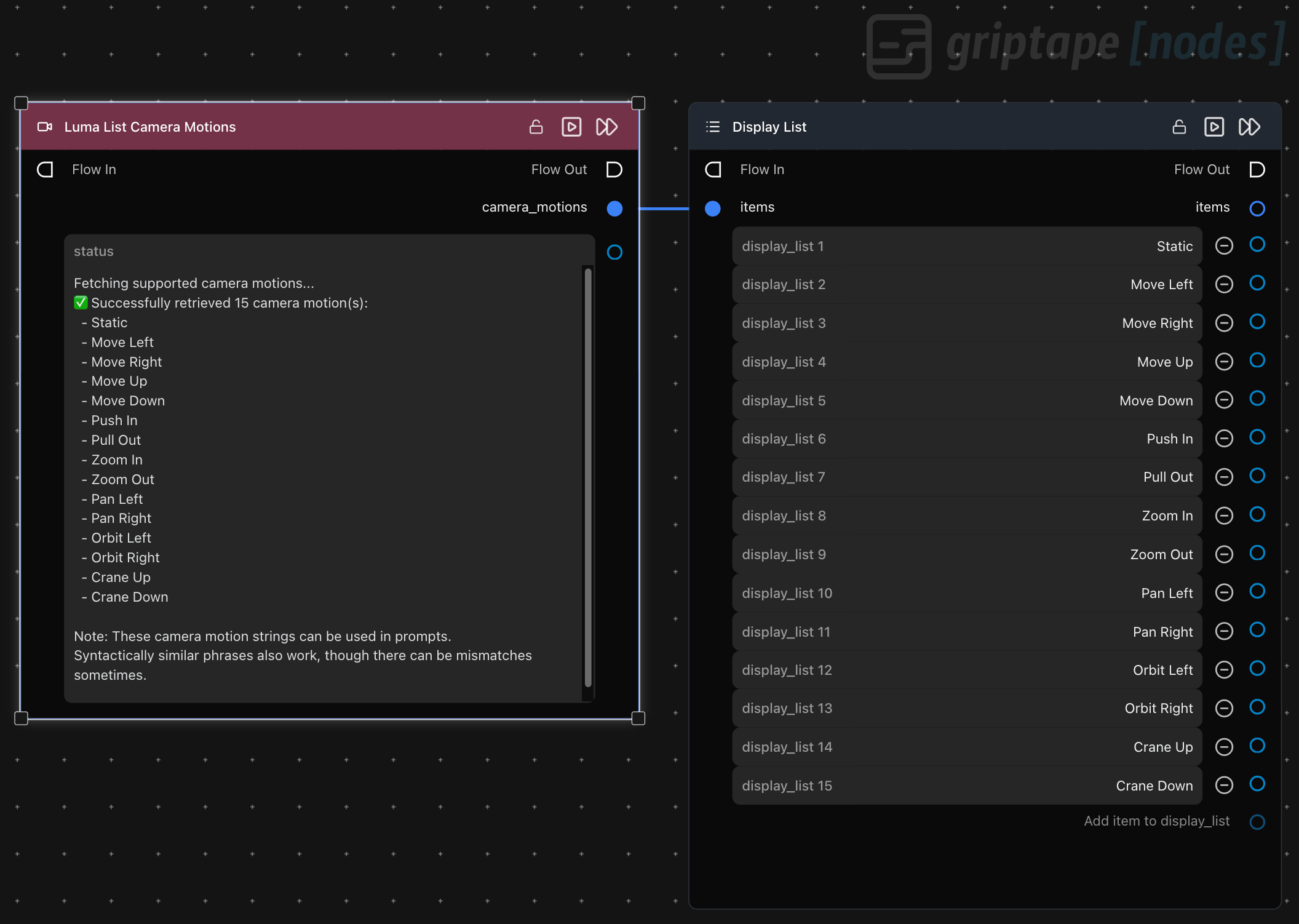
These prompt components remove guesswork. Rather than hoping your phrasing maps to the model’s intent, you can pick from canonical concepts and camera motions to consistently achieve the visuals you want.
Why this matters for artists, game teams, and VFX
Creative pipelines demand control and repeatability. With the Luma nodes in Griptape Nodes, you can:
- Keep character and style consistency across shots through image and character references.
- Apply scene-wide revisions using modify-video modes while preserving motion, performance, and continuity.
- Reframe shots for platform deliverables without starting over, including intelligent extension to fill new aspect ratios.
- Direct camera behavior from the prompt, for previs, animatics, or stylized storytelling, using supported motion phrases rather than trial-and-error.
Because Griptape Nodes is composable, you can chain Luma with other nodes and services, wrap the whole workflow in resource-efficient async execution, and share the pipeline with teammates without environment drift.
How to get started with the Luma add-on library
You can add Luma to your Griptape Nodes environment in minutes. Here’s the path from zero to producing shots:
- Get a Luma API key. Visit Luma Labs and generate a Dream Machine API key at https://lumalabs.ai/dream-machine/api/keys.
- Install the library. Clone the Luma nodes library from https://github.com/griptape-ai/griptape-nodes-library-luma and follow the README to add it to Griptape Nodes.
- Configure your secret. In Griptape Nodes, open the Settings Menu and add your API key as LUMAAI_API_KEY in the “API Keys & Secrets” section.
- Drop in nodes and build your workflow. Add Image Generation, Video Generation, Reframe and Modify Video nodes. Use Concepts and Camera Motion utility nodes to enrich prompts with supported controls. Choose models (photon-1 or photon-flash-1 for images; ray-2 or ray-flash-2 for video), set resolutions and aspect ratios, and iterate.
- Refine and render. Run your workflow, validate outputs, and adjust prompt components, camera motions, and modify-video modes to achieve your intended look. For mode behavior and limits on modify-video, see Luma’s guidance: https://docs.lumalabs.ai/docs/modify-video.
Discover and install more node libraries in the Griptape Nodes Directory
You can browse and install node libraries, including the Luma nodes, from the Griptape Nodes Directory. Visit https://github.com/griptape-ai/griptape-nodes-directory to explore the available integrations and bring Luma into your workspace with just a few clicks. The directory entry links to documentation and helps you keep libraries current across your team.
Build repeatable creative pipelines without the friction
Griptape Nodes gives you a visual, node-based canvas to design creative pipelines that scale from concept to production. It helps you:
- Compose complex workflows from multiple models and utilities.
- Share standards and settings across a team without environment configuration headaches.
- Track parameters and changes over time so you can diagnose issues and reproduce great results.
Get started now
Start building with Luma in Griptape Nodes today. Sign up free at https://www.griptapenodes.com, and install the Luma nodes library from https://github.com/griptape-ai/griptape-nodes-library-luma. With prompt-aware utility nodes, robust image and video models, and pixel-level reframing controls, you’ll move from ideas to finished shots faster, and with the consistency your craft demands.