
If you’re a digital artist, game designer, advertising creative, or VFX artist, you know that the right tools can turn a good idea into a show-stopping masterpiece. Griptape Nodes has already made it possible to harness the latest generative AI models for image, video, and audio creation, all in a visual, drag-and-drop environment. But what if you want to go further, tapping into new models, APIs, or community-built features without wrestling with the command line?
That’s where the new Griptape Nodes library management feature comes in, making it easier than ever to extend your creative toolkit with just a few clicks.
What Are Node Libraries and Why Should You Care?
Node libraries are collections of nodes. Think of them as creative building blocks that add new capabilities to Griptape Nodes. These might include advanced image manipulation, text-to-3D generation, video upscaling, or even music composition. Previously, adding these libraries meant using the CLI, Git and manually editing engine settings. Now, it’s as simple as browsing, clicking, and confirming.
Getting Started: Adding Node Libraries in Seconds
To add new creative powers to your Griptape Nodes workspace, just open the settings menu and select “Library Management.” You’ll see a dialog showing all your installed libraries. To add more, click “Community Libraries”. This takes you to the Griptape Nodes Directory on GitHub, where you’ll find a growing list of both official and community-contributed libraries.
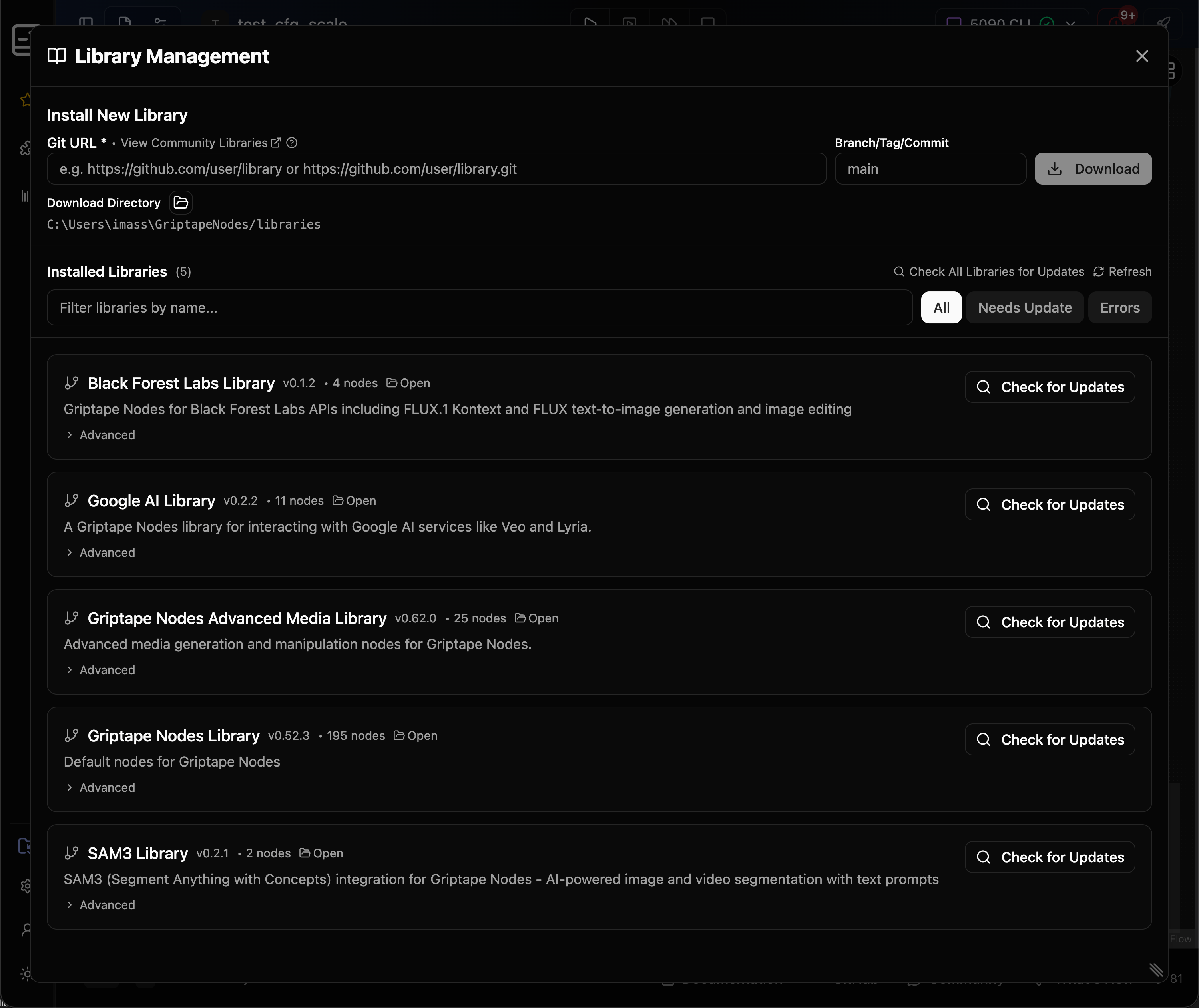
For example, if you want to experiment with high-quality image generation and editing, you might add the Black Forest Labs library. Just click “Add to Griptape Nodes,” confirm the download, and the library appears in your workspace. Refresh your libraries, and you’ll see new nodes ready to use in your left-hand navigation panel.
Real-World Examples from the Griptape Nodes Directory
The Griptape Nodes Directory is packed with libraries that can transform your workflow:
- Black Forest Labs: Access FLUX APIs for advanced image generation and editing.
- Hyper3D Rodin: Generate 3D models from text or images, perfect for game assets or VFX.
- Google AI: Tap into Google’s Imagen, Gemini, and Veo models for cutting-edge image, video, and audio generation.
- Topaz Labs: Denoise, enhance, and upscale images and videos with industry-leading models.
You’ll find libraries for everything from Blender integration to Neo4j graph databases, AWS Deadline Cloud rendering, and more in the Griptape Nodes Directory.

Each library’s README on GitHub details any required API keys or secrets. Simply add these in the Griptape Nodes settings under “API Keys and Secrets,” and you’re ready to go.
From Installation to Creation with No Command Line Required
Once your new library is installed, simply drag its nodes onto your canvas, connect them to your workflow, and hit Run. For example, you could use the Black Forest Labs FluxText-to-Image node to generate concept art, or the Google AI Lyria Audio Generator to compose original soundtracks for your next trailer, all without leaving Griptape Nodes.
Why This Matters for Creative Professionals
With the new library management feature, you’re no longer limited by what ships out of the box. You can instantly access the latest models, experiment with community innovations, or even author your own libraries to share with others. This means less time wrestling with setup, and more time creating.
Ready to Expand Your Creative Horizons?
Griptape Nodes is committed to making generative AI accessible, flexible, and endlessly extensible for creative professionals. The new library management feature puts a universe of creative tools at your fingertips, no technical barriers, just pure possibility.
Visit griptapenodes.com to sign up, explore the documentation, and start building with the latest node libraries today. Dive into the Griptape Nodes Directory, join the community on the Griptape Discord, and see how easy it is to bring your boldest ideas to life.